I don’t write code line by line anymore. All of my recent projects are built through AI-assisted, spec-driven and test-driven development, supported by custom tooling for context management, compliance checks, and persistent memory.
Vibe coding here means letting the model “just build it” from loose prompts—minimal specs, no clear constraints, and very little structure. It’s fine for quick prototypes, but it tends to produce brittle code and inconsistent behaviour.
By contrast, AI-assisted development in this context means treating the model as a disciplined collaborator: it writes most of the code, tests, and glue, but it does so from explicit specs, skills, and tooling, with me designing the architecture and validating the output.
For 100% AI-assisted work, the setup matters more than any single prompt. My process is built around three practices:
- Spec(ification)-driven development
- Dynamic context management
- Test-driven development
Spec-driven development has become one of the most effective parts of my AI-assisted workflow. I invest a lot of time upfront in detailed spec docs before any implementation starts.
I use a feature-interview agent that takes a feature description and interrogates it: edge cases, business rules, constraints, failure states, and UX expectations. The output is saved as spec-[feature].md and becomes the source of truth for the agents implementing the work.
Not every project starts with a perfect spec. For more exploratory or experimental work, I often begin with smaller, incremental AI-assisted changes to find the right interaction, design, feature or behaviour.
Once the feature set feels right and the functionality is stable, I create a spec document from the working solution. That spec becomes the new source of truth, and I then have Claude Code completely rewrite the implementation based on the spec—treating the existing code as a loose reference, not something to preserve.
This “spec after exploration” loop has been very effective. It turns incremental experiments into clean, consistent, spec-compliant code without losing what worked.
Dynamic context management
Being deliberate about how the models get and keep context has had the biggest impact on the quality of the output.
Skills
Unlike many setups, my CLAUDE.md file is intentionally light. It only contains project-wide information like stack details, folder structure, and core conventions.
Everything else lives in skills. A sample of the skills for this stack:
- Frontend
- Backend
- Supabase
- AI-agents
- Context
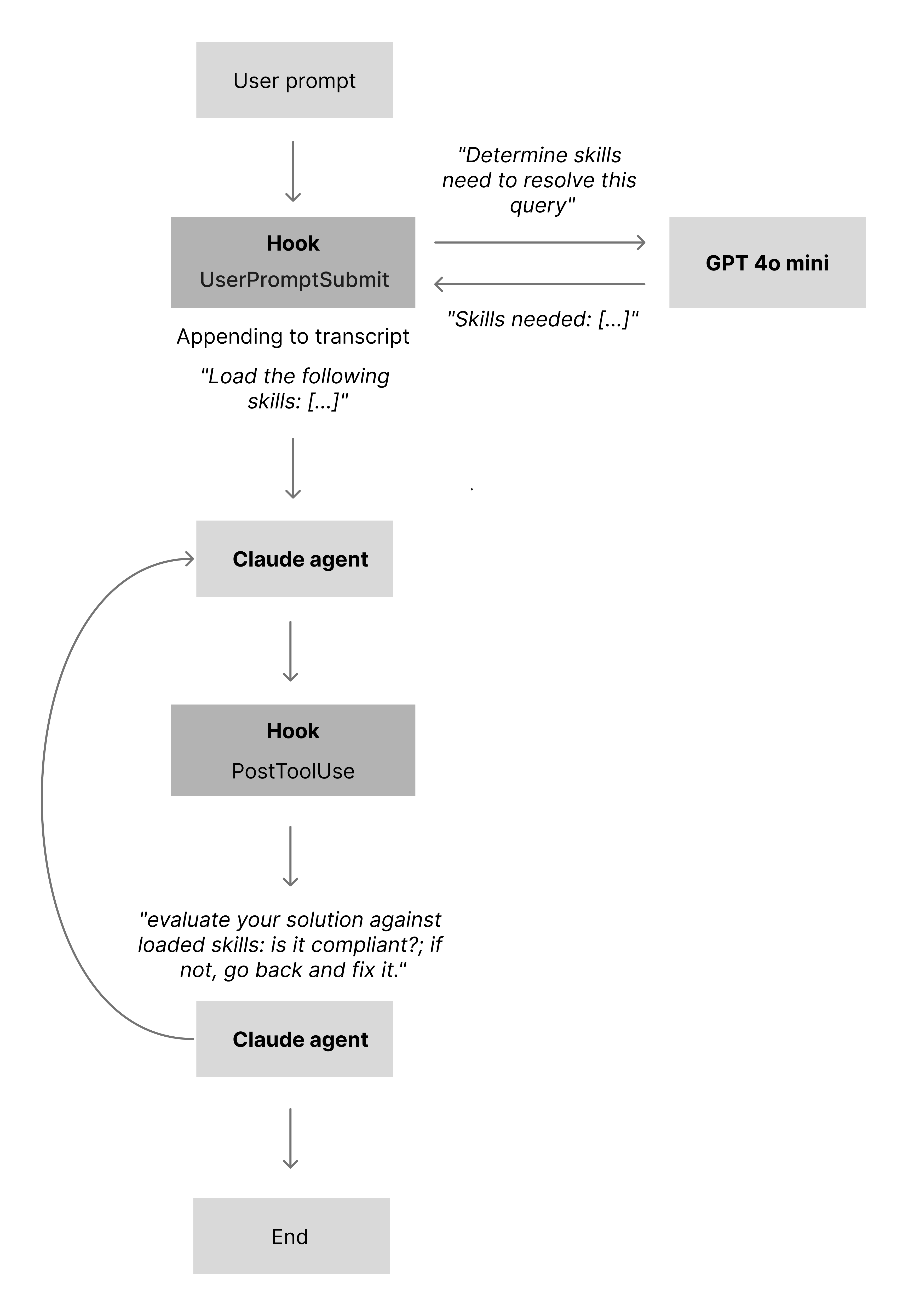
At the time of writing, Claude Code is still inconsistent at loading all relevant skills for a given task, even with optimized one-line skill descriptions. To work around this, I’ve created a skills script that runs on the UserPromptSubmit hook. The script uses an LLM to determine which skills are needed for the current task, and if any required skills are not already present in the conversation, it loads them automatically.
Skills compliance
Once skills are loaded, the next challenge is keeping the model aligned with them as the conversation grows and the context gets noisy.
To keep answers aligned with the active skills, I use a second script wired into the PostToolUse hook. After the model has produced a response (and used any tools it needs), the script asks the LLM to evaluate its own answer against the loaded skills: is it compliant; if not, go back and fix it. In practice, this catches around 90% of skill-level oversights.
The remaining gaps are handled by a custom version of the Claude Code code-review agent. It runs targeted checks for:
- Skills and
CLAUDE.md compliance
- Logic errors and race conditions
- Security issues (injection, XSS, the usual OWASP list)
- TypeScript strictness
Each issue is scored by confidence, and anything below 80 is filtered out. The agent also runs explicit compliance checks against the active skills and the CLAUDE.md file, which helps catch file-wide violations.
Persistent memory
When working on a feature or bug within a complex feature set, Opus will load the files it thinks are relevant to get the context it needs. The problem is that it often misses important pieces, and business logic decisions are not always obvious just from reading the code.
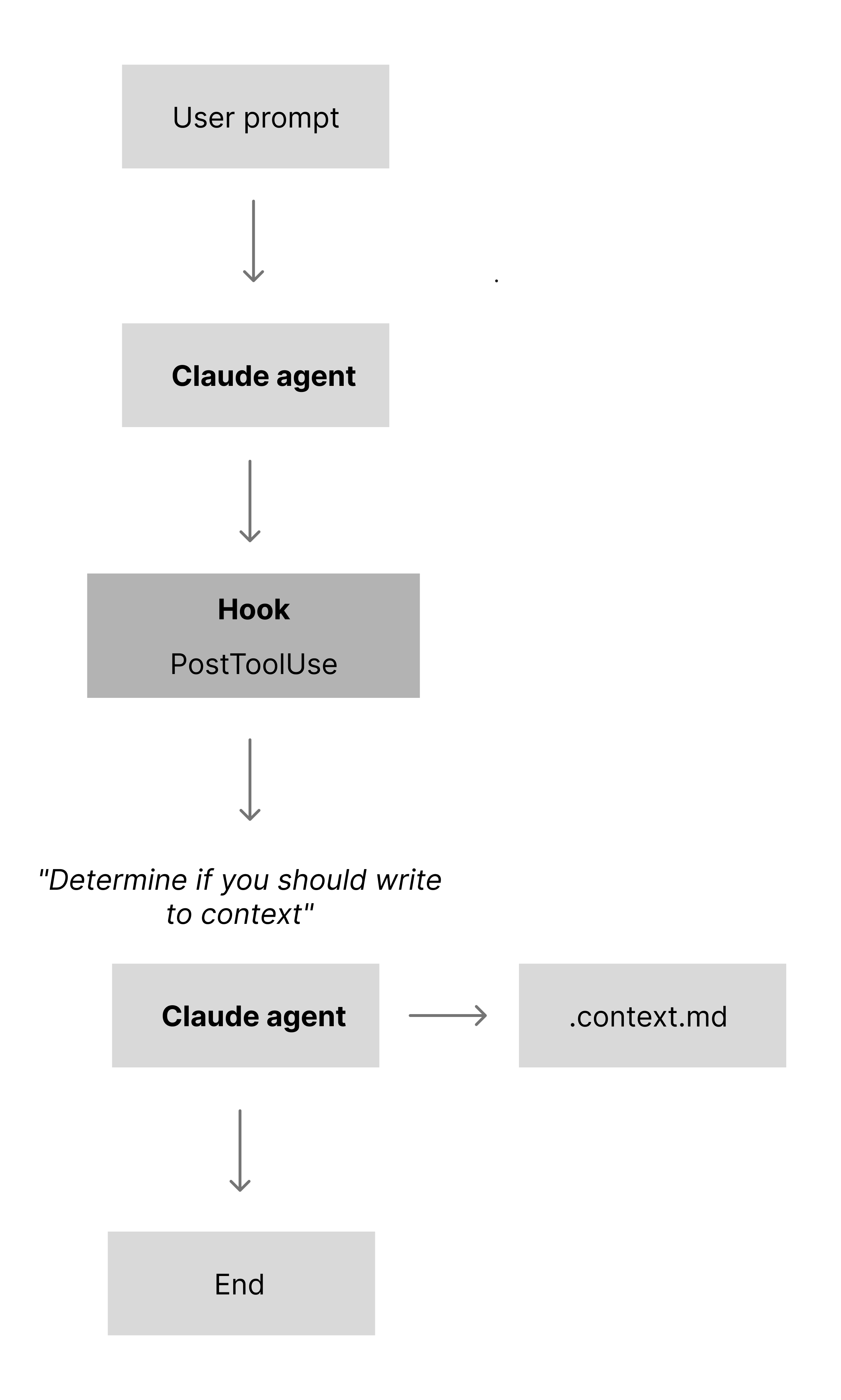
To fix that, I use a persistent-memory skill that runs on stop. It inspects the changes and decides whether to create or update a .context.md file in the folder it’s working in. The content is deliberately short: a few lines that capture key decisions, constraints, and non-obvious behaviour for that part of the system. On every prompt, the agent reads all .context.md files in the current folder and then walks up the tree until it hits /app or /components (similar to how .CLAUDE files work on a folder level). In practice, this has reduced mistakes, regressions, and incorrect assumptions.
One of the biggest weaknesses in my current setup is that each task still runs inside the same long-lived agent. Ideally, every task would:
- Spawn a dedicated sub-agent
- Load only the skills it needs
- Solve the task in isolation
- Return its result back to the main agent
The Claude Code Superpowers plugin already implements much of this pattern (among other things), but it inherits the same underlying limitation around reliably loading all relevant skills. To get the best of both worlds, I would need to combine Superpowers’ sub-agent model with my skills-matcher script so each sub-agent also gets the right skills attached.
“We’re not doing it because it’s easy, we’re doing it because we thought it would be easy.”
Extracting the vendor data has been by far the most challenging part of this project—ironically the part I assumed would be straightforward.
The challenges fall into two areas:
There are an estimated 1M commercial property maintenance vendors with around 3M branches in the US. In this first iteration, I’m extracting data from 120,000 vendors.
Solution 1 — Direct URL extraction
What I tried: Call the OpenAI API with "Visit commercial vendor [URL] and extract the following fields: {name, address, …}", letting the model handle everything.
Result: The requests all succeeded, but the outputs were full of hallucinated data. Models called through the API can’t actually browse to a URL (this was early 2025), so they guessed based on the domain and prior training instead of reading the page.
Solved: Nothing.
Remaining problems: No reliable way to get real vendor data—when asked to “visit” a URL, the model happily invents details.
Solution 2 — Full-site crawl + single-pass extraction
What I tried: Since the model couldn’t access the internet directly, I did the crawling myself: crawl the entire site (all pages), feed all pages to the model, and ask it to extract the vendor fields.
Result: Around 50% of the test sites were blocked by bot protection. For the remaining (often small, local) vendors, the total token count per site ran into the millions once you included HTML, JavaScript, CSS, SVGs, and irrelevant pages like blogs. Hallucinations were still common because the model was overwhelmed with noisy input.
Solved: For sites that weren’t blocked, agents now had full access to vendor content.
Remaining problems: Bot blocking on many sites, massive token usage, and continued hallucinations from overloaded context.
Solution 3 — Adaptive scraper + context management
What I tried: Reduce token usage and avoid blocking by building a custom scraper that escalates scraping strategies based on server response (fetch → headless browser → external scraping service like Oxylabs). Strip out <script>, <head>, <svg>, and other non-content elements, then convert the remaining HTML to Markdown.
Result: Bot blocking was no longer an issue, and total tokens per site dropped significantly. But the content was still too large and too noisy to feed directly into a model for precise extraction. To keep costs down I used 4o mini, and the combination of a cheaper model and large, messy inputs still produced hallucinations.
Solved: Bot blocking and some of the worst token bloat.
Remaining problems: Total cost remained high, and the content size/noise was still causing hallucinations.
Solution 4 — ContentLocationPredictionAgent for targeted crawling
What I tried: Instead of crawling the entire site, crawl just the landing page, extract only links, and hand those to an LLM tool (ContentLocationPredictionAgent). For each extraction area (e.g. “branding”, “operational”, “legal”, “reviews”), I pass the bucket of links plus a description of what I’m looking for, and the agent predicts which links are most likely to contain that content.
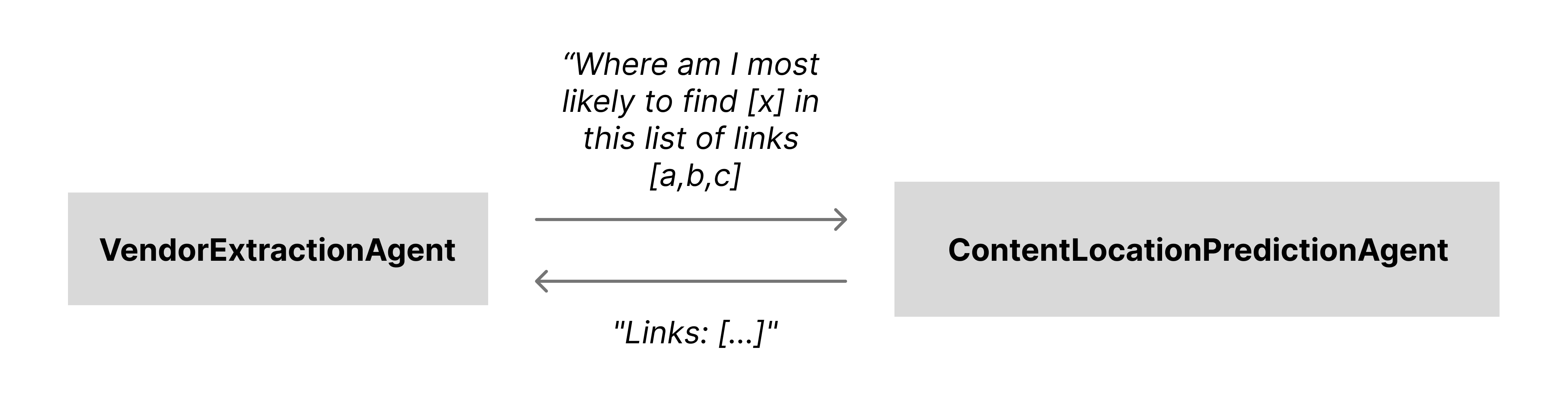
Result: With ContentLocationPredictionAgent, I only extract content from relevant pages—on average 3–5 pages per data area like branding, legal, operational, reviews, etc. Token usage dropped further and general hallucinations decreased.
Solved: Token usage and general hallucinations were now at a manageable level.
Remaining problems: There were still smaller issues with the extracted data like incorrect or non‑existent phone numbers and links, information that occasionally went missing, and the whole pipeline was still slow.
The solution to this leads up to the next challenging area, Agentic AI.
All agents, sub-agents, and tools for this pipeline are built with the OpenAI Agents SDK.
Solution 5 — Orchestrated sub-agents and parameter tuning
What I tried: With most content issues solved, the remaining problems were wrong or missing fields (phone numbers, links) that showed up in a patterned way. Instead of blaming 4o mini alone, I tightened the sampling settings and changed the architecture: I moved from an OpenAI Agent with automatic tool selection to a normal function that calls each sub-agent explicitly.
In this setup, those sampling settings mostly control how aggressive the model is about “filling in gaps” versus copying what it sees. top_p controls sampling diversity (lower values keep it closer to the most likely tokens), while presence_penalty and frequency_penalty nudge the model away from reusing common tokens and patterns unless the context strongly supports them. In the earlier configuration, a relatively loose setup made 4o mini too willing to guess plausible-looking phone numbers and URLs when the input was ambiguous. Lowering top_p and increasing the penalties made it behave more extractively: it tends to copy numbers and links from the scraped content, instead of inventing new ones.
Result: Previously, the orchestration pattern ran everything through one OpenAI LLM Agent. 4o mini has a large initial context window, but only around a 20K token carry-over between turns. With seven sub-agents sometimes producing large outputs, their combined results could exceed that limit and trigger silent compression—explaining why details sometimes “disappeared”. After the change, the main extractor is no longer an OpenAI Agent; each sub-agent is still technically an agent, but they are invoked in isolation. This pushes the 20K carry-over limit down to each sub-agent call instead of one shared conversation.
Solved: The main sources of hallucinations and missing data in this pipeline—aggressive sampling plus a shared, overfilled context window.
Remaining problems: No structural issues left in this extractor beyond normal LLM noise.
Most of the vendor data is normalized and cleaned, but “services offered” is intentionally not. In this industry there are no well-defined categories—some vendors do all of HVAC, others only a tiny subset, and they often describe the same service with very different language.
This is where semantic search comes in. It lets me store “services offered” exactly as vendors describe them, while still allowing users to search in their own words and get good matches based on meaning rather than exact wording.
Making semantic search location-aware
Plain semantic search returns the highest-scoring matches, which can be misleading. For example, a query like “Show me the top plumbers in Orange County” might return a plumbing vendor from Ohio and an HVAC vendor in Orange County: one matches “plumbing” perfectly, the other matches the location and is semantically close to “plumbing”.
To fix this, I added two constraints:
- Every vendor search requires both a location (like city, street, or neighbourhood) and a service. If the user asks “Find me top plumbers”, the system responds with “In which location?”. Once we have the location, an LLM extracts the county, and the search is limited to vendors whose service areas include that county (service areas are stored as counties).
- I raised the minimum similarity score for matches, so HVAC vendors aren’t returned for “plumber” queries just because the embedding space thinks they’re “close enough”.
To make semantic search more consistent, I use two small agents:
- Vendor normalizer – Converts each vendor record (location, services, size, etc.) into a standardized “embedding text” format and stores that in the database.
- Query normalizer – Takes any incoming user query and rewrites it into the same structured format used for vendor embeddings.
So a query like:
“I’m looking for a great vendor in downtown San Francisco who can help with a broken fixture”
gets rewritten to something like:
“Vendor in San Francisco County offering plumbing services.”
Because both the stored vendor text and the rewritten query follow the same structure, the embeddings line up better and the search results become far more accurate.
Live at discovervendors.com.